Remove swear words using AI in Premiere Pro
Remove swear words using AI in Premiere Pro
FireCut scans your video for profanity, and lets you mute or bleep it in seconds!
FireCut scans your video for profanity, and lets you mute or bleep it in seconds!





Designed for DaVinci Resolve
Works on















"FireCut's profanity remover helps me feel safer about my YouTube channel."
"This is a game changer!"
"I love that I can add custom swear words as well as use the standard detection."

How to remove swear words in DaVinci Resolve with FireCut?
How to remove swear words in DaVinci Resolve with FireCut?
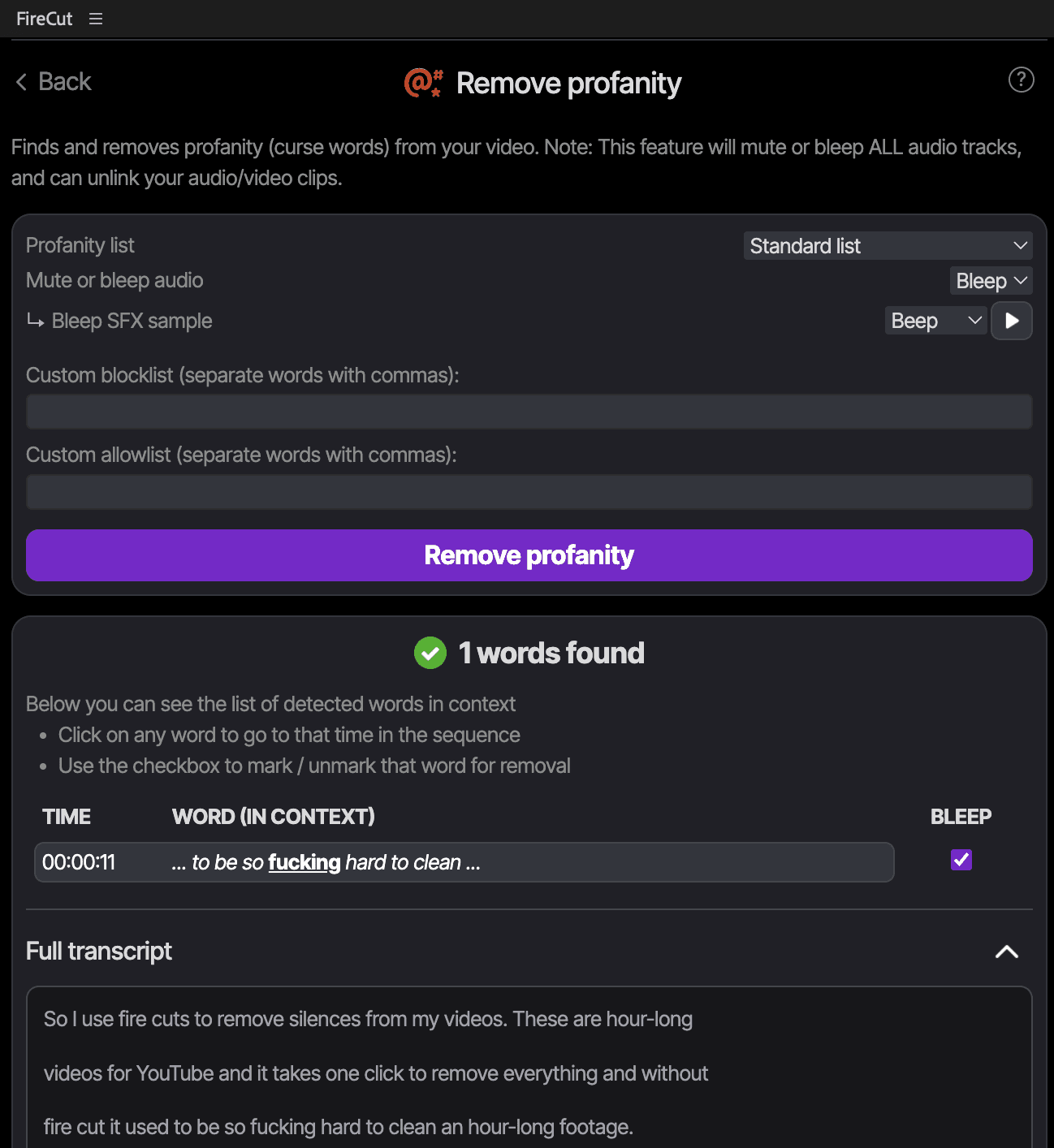
Whether creating content for platforms like YouTube, TikTok, or preparing a corporate presentation, there are things you can or cannot as per the rules. One slip of inappropriate language can get your video demonetized, restricted, or rejected entirely.
With FireCut's Remove Profanity feature, you can automatically detect and clean up inappropriate language from your videos without having to scrub through hours of content yourself - which is not only tedious and time-consuming, but you might miss words or accidentally cut too much audio, affecting the flow of your content.
FireCut's AI analyzes your audio across multiple languages and identifies curse words with precision. You can choose to either mute the words completely or replace them with classic bleeps for a more professional finish.
To remove profanity with FireCut:
Go to "Remove Profanity"
Select your video's language
Press "Analyze"
Review the identified curse words FireCut found
Choose to "mute" or "bleep" the flagged words
Add custom words to your "allow list" (words to keep) or "block list" (additional words to remove)
Click "Remove Profanity"
As your personal AI video editing assistant, FireCut gives you granular control with custom allow and block lists. Maybe certain words are acceptable for your audience, or perhaps you want to flag industry-specific terms that aren't typically considered profanity but don't fit your brand.
You have complete control over what stays and what goes.
Whether creating content for platforms like YouTube, TikTok, or preparing a corporate presentation, there are things you can or cannot as per the rules. One slip of inappropriate language can get your video demonetized, restricted, or rejected entirely.
With FireCut's Remove Profanity feature, you can automatically detect and clean up inappropriate language from your videos without having to scrub through hours of content yourself - which is not only tedious and time-consuming, but you might miss words or accidentally cut too much audio, affecting the flow of your content.
FireCut's AI analyzes your audio across multiple languages and identifies curse words with precision. You can choose to either mute the words completely or replace them with classic bleeps for a more professional finish.
To remove profanity with FireCut:
Go to "Remove Profanity"
Select your video's language
Press "Analyze"
Review the identified curse words FireCut found
Choose to "mute" or "bleep" the flagged words
Add custom words to your "allow list" (words to keep) or "block list" (additional words to remove)
Click "Remove Profanity"
As your personal AI video editing assistant, FireCut gives you granular control with custom allow and block lists. Maybe certain words are acceptable for your audience, or perhaps you want to flag industry-specific terms that aren't typically considered profanity but don't fit your brand.
You have complete control over what stays and what goes.
Try it for free
Requires DaVinci Resolve 20+ (Free and Studio on Windows/Mac/Linux)
Our users LOVE FireCut
The first day using FireCut was insane, finished 17 edits at work today!
 Martin Nguyen
@mrtnlai
It is freaking awesome holy shit! Loving FireCut, I’ve edited 3 full videos in like 3 days it’s insane.
 Jenry
Jenry@.jenry
After applying the silence cutting, my already-edited episode went down 5 mins, AMAZING! And the cuts looked great to me!
 Ryan Helms
@theryanhelms
FireCut is actually so good! How are you guys building new features so fast?
 Jaydub
@jaydubedits
This is epic, I'm stoked to see how minimal and purposeful it is compared to the other apps. You guys are crushing it!
 Zachary Staines
@zacharystaines
FireCut has actually been a gamechanger for all of the work I do! Over the last few weeks it has made my job infinitely easier
 Jay
Jay@limitlessjayson
FireCut is awesome! I've ran it through 6hours of content in just 20min. I also really like the auto zooms - works well and fast.
 Daniel Antero
I LOVE the captions feature in FireCut. I've been using it for all of my clients.
 Cessna Creative
The tool is incredible and I am personally shocked how efficient it is! Haven’t seen anything that comes close to its user experience and impact in editing.
 Muslim Kasumov
The fact that it could create chapters for the most random gameplay commentary of my client and wasnt wrong once is amazing! Insane stuff.
 Oval
Oval@OvalCreations
I am absolutely amazed on how well FireCut works, it really feels like magic! This is saving me hours of work.
 Editor Bzzuf
@bzz_uf
Amazing AI! Literally this is motivating me to make more videos.
 Nithin Koppera
FireCut is amazing, literally helped me get a video 90% done in 2 hours, usually they were taking me around 5-6! And love seeing the regular updates
 Callum
@Atrialic
I just used FireCut for my latest video and it was a massive time saver!
 Fynn
Fynn@itsfynnisgone
We’ve been using it since the beta version. It saves SO much time with every edit!
 Physiq
@physiq.official
Best tool ever!!! It has now become an essential part of my workflow, saving me hours of work. I absolutely love it.
 Aditya Nagpal
@iadinagpal
FireCut saves me 3+ hours per podcast episode. Down the road, it's going to save 100+ hours on just our podcast alone!
 Sebastian Kolter
invisu.dk (prod. agency)